
What you can build
Document assistants
Agents that answer questions grounded in your uploaded files and knowledge sources.
Tool-using agents
Agents that take action — sending messages, fetching data, updating records in connected apps.
Multi-step workflows
Chains of agents and steps that pass results from one to the next to handle complex tasks.
API-powered features
Workflows you call from your own product through a simple API.
How it works
A workflow is a diagram you build on a visual canvas. You drag in nodes — building blocks like an Input, an Agent, or an Output — and connect them to define how information flows. The core building block is the Agent: an AI step you configure with instructions, a model, and optionally tools and a knowledge base. When you run the workflow, each node executes in order and passes its result onward.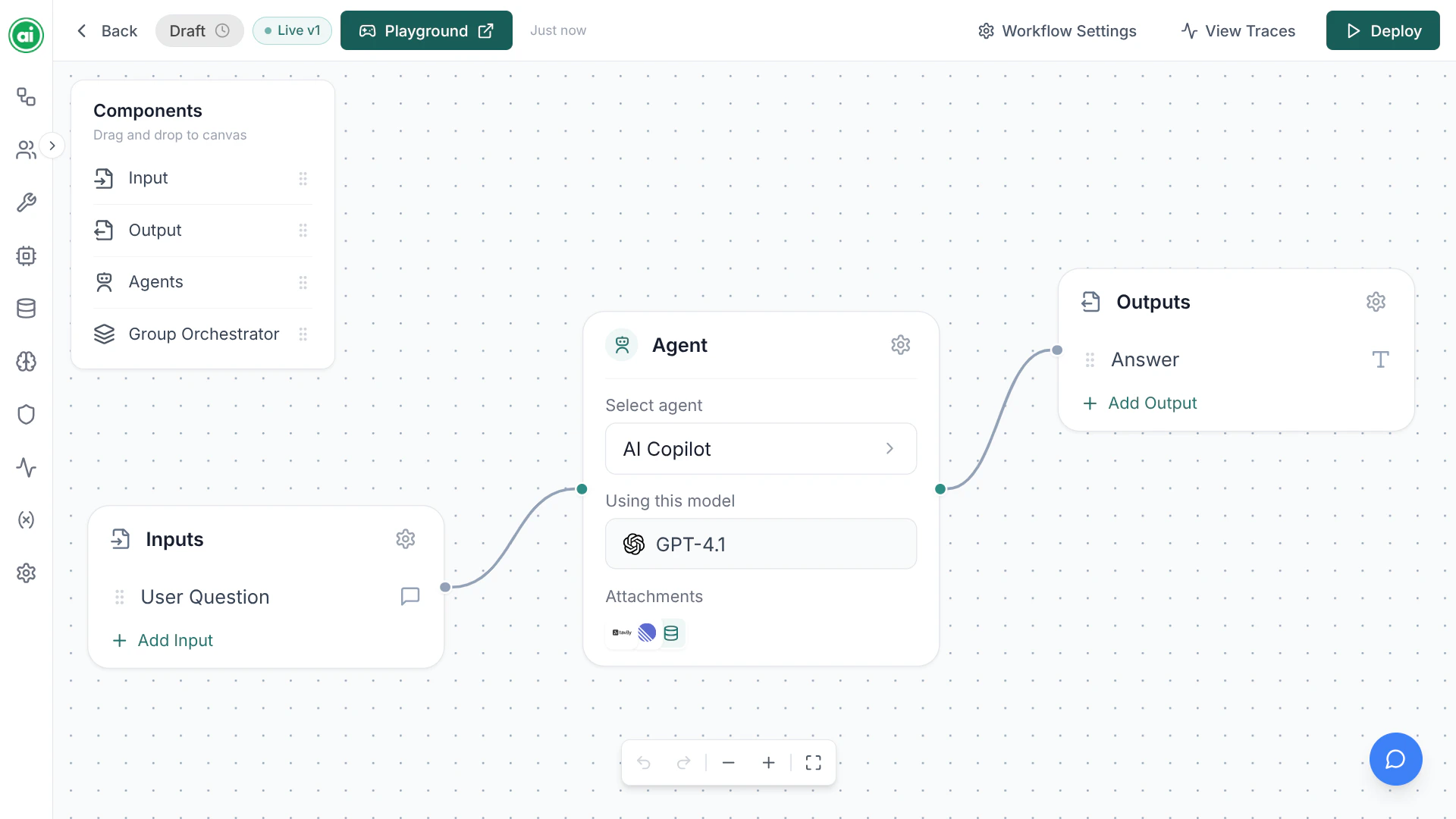
A workflow on the builder canvas — an Input, an Agent, and an Output node connected together.
The typical journey
1
Create a workflow
Start from a blank canvas and give your workflow a name.
2
Build it
Add nodes, configure your agent, and connect everything together.
3
Test it
Open the Playground and try your workflow with real inputs.
4
Deploy it
Publish the workflow so it can be run by your team or through the API.
5
Monitor it
Review every run in Tracing to see exactly what happened.
Next steps
Quickstart
Build and run your first workflow in a few minutes.
Key concepts
Learn the vocabulary used throughout the platform.