> ## Documentation Index
> Fetch the complete documentation index at: https://docs.platform.aiplanet.com/llms.txt
> Use this file to discover all available pages before exploring further.
# Operator console
> Manage keys, models, budgets, and usage from the private operator console.
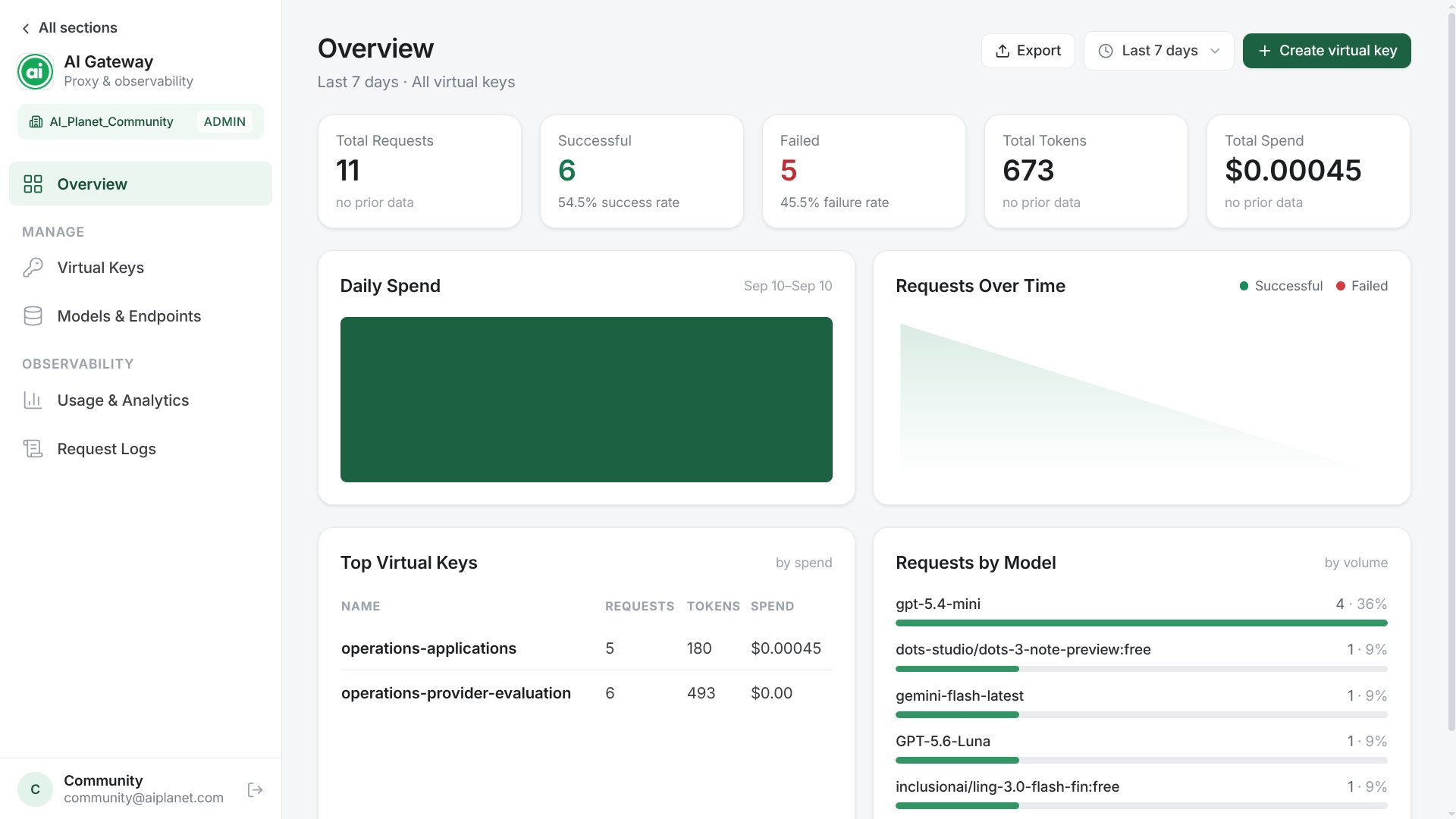
AI Planet managed deployments expose the operator console at the Platform's
`/gateway` path. The browser uses a same-origin `/gateway/api/*` facade while
the private gateway Admin API remains `/admin/*` behind the deployment edge.
Self-managed installations may keep the bundled `/admin/ui` default. The
console manages concrete models, aliases, and application API keys and shows
usage, cost, budgets, alerts, and reservation state. The same workflows remain
available through the Admin API for automation.
 Platform members enter through the signed organization handoff. Break-glass
operators can use the console's `/operator/login` route. Successful login
creates an opaque session in an `HttpOnly`, `SameSite=Strict` cookie scoped to
the console path; the browser never stores an admin API key. Keep the raw Admin
API on a private operator origin.
The first administrator is bootstrapped from a password environment variable during deployment. System admins can create and disable `system_admin`, `system_operator`, `org_admin`, `org_operator`, and `org_viewer` users under **API Keys → Administrators**. Organization roles require one organization scope; the API forces all tenant data and key mutations into that scope. System operators manage global gateway resources but not identities. Legacy `admin`, `operator`, and `viewer` records continue to work as aliases.
## Create an API key
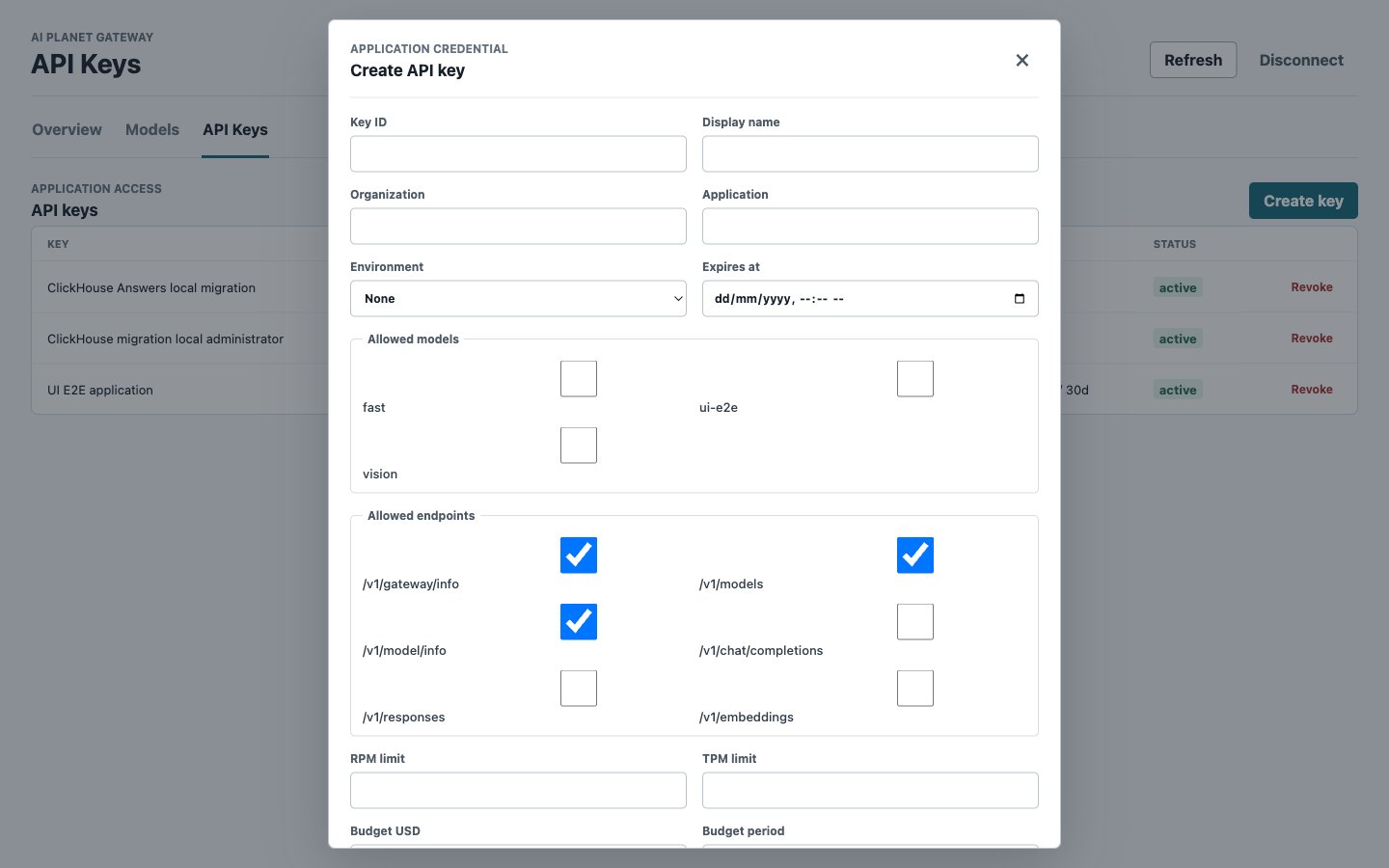
Flow: **API Keys → Create key → choose aliases and endpoints → set limits and budget → Create**.
The console displays the raw token exactly once. Put it in the application's secret manager before closing the result dialog.
Platform members enter through the signed organization handoff. Break-glass
operators can use the console's `/operator/login` route. Successful login
creates an opaque session in an `HttpOnly`, `SameSite=Strict` cookie scoped to
the console path; the browser never stores an admin API key. Keep the raw Admin
API on a private operator origin.
The first administrator is bootstrapped from a password environment variable during deployment. System admins can create and disable `system_admin`, `system_operator`, `org_admin`, `org_operator`, and `org_viewer` users under **API Keys → Administrators**. Organization roles require one organization scope; the API forces all tenant data and key mutations into that scope. System operators manage global gateway resources but not identities. Legacy `admin`, `operator`, and `viewer` records continue to work as aliases.
## Create an API key
Flow: **API Keys → Create key → choose aliases and endpoints → set limits and budget → Create**.
The console displays the raw token exactly once. Put it in the application's secret manager before closing the result dialog.
 For repeatable provisioning, use [Create a key with the API](/llm-gateway/administration/api-keys#create-a-key).
## Inspect an API key
Flow: **API Keys → Details**.
The read-only detail view shows tenant, application, environment, model and endpoint scopes, RPM/TPM, budget, expiry, rotation-overlap deadline, status, and whether the key is owned by deployment configuration or the database. Organization-scoped users can inspect only keys returned for their organization. Raw tokens and token hashes are never available in this view.
Use the [List keys API](/llm-gateway/administration/api-keys#list-keys) to retrieve the same safe metadata for automation.
## Edit an API key
Flow: **API Keys → Edit → change policy → Save changes**.
The key ID, tenant/application identity, environment, role, and token remain unchanged. You can edit its display name, model and endpoint scopes, RPM/TPM limits, expiry, and budget. The same raw token continues to work under the new policy, and no token is displayed or returned.
For budget changes, the dialog states that the new limit applies immediately to the current period and shows spent, reserved, committed, and available-after-save amounts on one line. A changed reset interval appears separately because it starts with the next period and does not reset current usage or move the current period deadline. Lowering the limit below spent plus reserved usage adds a separate warning, requires confirmation, and causes new requests to fail until capacity is available; existing reservations can still settle. Budget enforcement cannot currently be removed through an edit.
See [Update a key](/llm-gateway/administration/api-keys#update-a-key) for the API contract and deployment-owned key behavior.
## Review usage
Flow: **Overview → select time range → filter application, environment, model, or provider**.
For repeatable provisioning, use [Create a key with the API](/llm-gateway/administration/api-keys#create-a-key).
## Inspect an API key
Flow: **API Keys → Details**.
The read-only detail view shows tenant, application, environment, model and endpoint scopes, RPM/TPM, budget, expiry, rotation-overlap deadline, status, and whether the key is owned by deployment configuration or the database. Organization-scoped users can inspect only keys returned for their organization. Raw tokens and token hashes are never available in this view.
Use the [List keys API](/llm-gateway/administration/api-keys#list-keys) to retrieve the same safe metadata for automation.
## Edit an API key
Flow: **API Keys → Edit → change policy → Save changes**.
The key ID, tenant/application identity, environment, role, and token remain unchanged. You can edit its display name, model and endpoint scopes, RPM/TPM limits, expiry, and budget. The same raw token continues to work under the new policy, and no token is displayed or returned.
For budget changes, the dialog states that the new limit applies immediately to the current period and shows spent, reserved, committed, and available-after-save amounts on one line. A changed reset interval appears separately because it starts with the next period and does not reset current usage or move the current period deadline. Lowering the limit below spent plus reserved usage adds a separate warning, requires confirmation, and causes new requests to fail until capacity is available; existing reservations can still settle. Budget enforcement cannot currently be removed through an edit.
See [Update a key](/llm-gateway/administration/api-keys#update-a-key) for the API contract and deployment-owned key behavior.
## Review usage
Flow: **Overview → select time range → filter application, environment, model, or provider**.
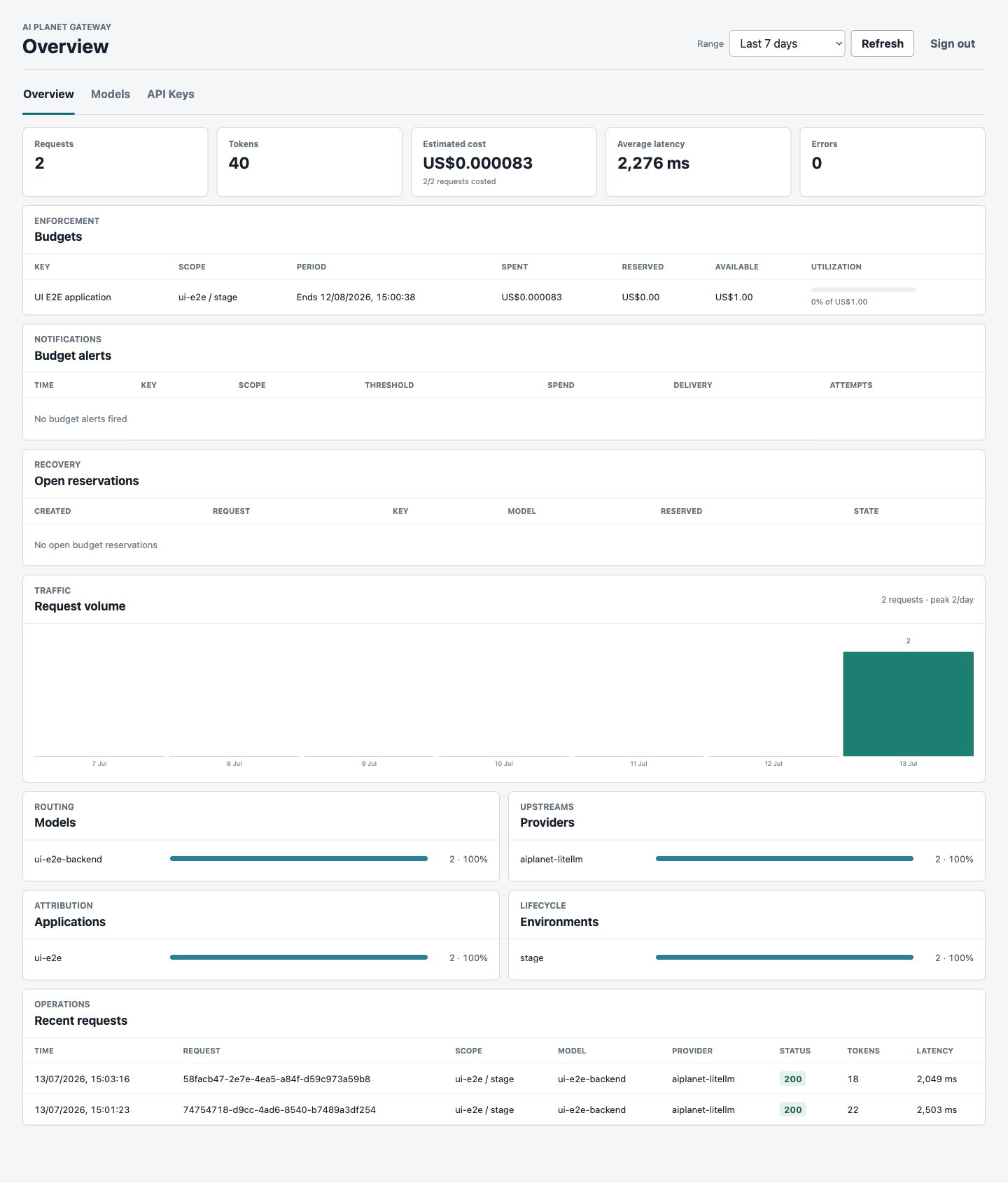 The [Usage and cost APIs](/llm-gateway/administration/usage) expose the same source data.
When database payload capture is enabled, a **View** action appears on eligible rows under **Overview → Recent requests**. It opens the retained input and output for that one request. Rows without retained content show **Not stored**; a row may lose its payload before its usage metadata because payload retention is configured separately.
## Set and monitor a budget
Set the budget and duration while creating a key. The Overview shows spent, reserved, available, utilization, reset, alert delivery, and reservation state.
The [Usage and cost APIs](/llm-gateway/administration/usage) expose the same source data.
When database payload capture is enabled, a **View** action appears on eligible rows under **Overview → Recent requests**. It opens the retained input and output for that one request. Rows without retained content show **Not stored**; a row may lose its payload before its usage metadata because payload retention is configured separately.
## Set and monitor a budget
Set the budget and duration while creating a key. The Overview shows spent, reserved, available, utilization, reset, alert delivery, and reservation state.
 Use the [Budget APIs](/llm-gateway/administration/budgets) for monitoring automation.
## Configure models
Flow: **Models → Add model → review provider mapping, capabilities, and pricing → Add alias → select one or more weighted targets**.
Use the [Budget APIs](/llm-gateway/administration/budgets) for monitoring automation.
## Configure models
Flow: **Models → Add model → review provider mapping, capabilities, and pricing → Add alias → select one or more weighted targets**.
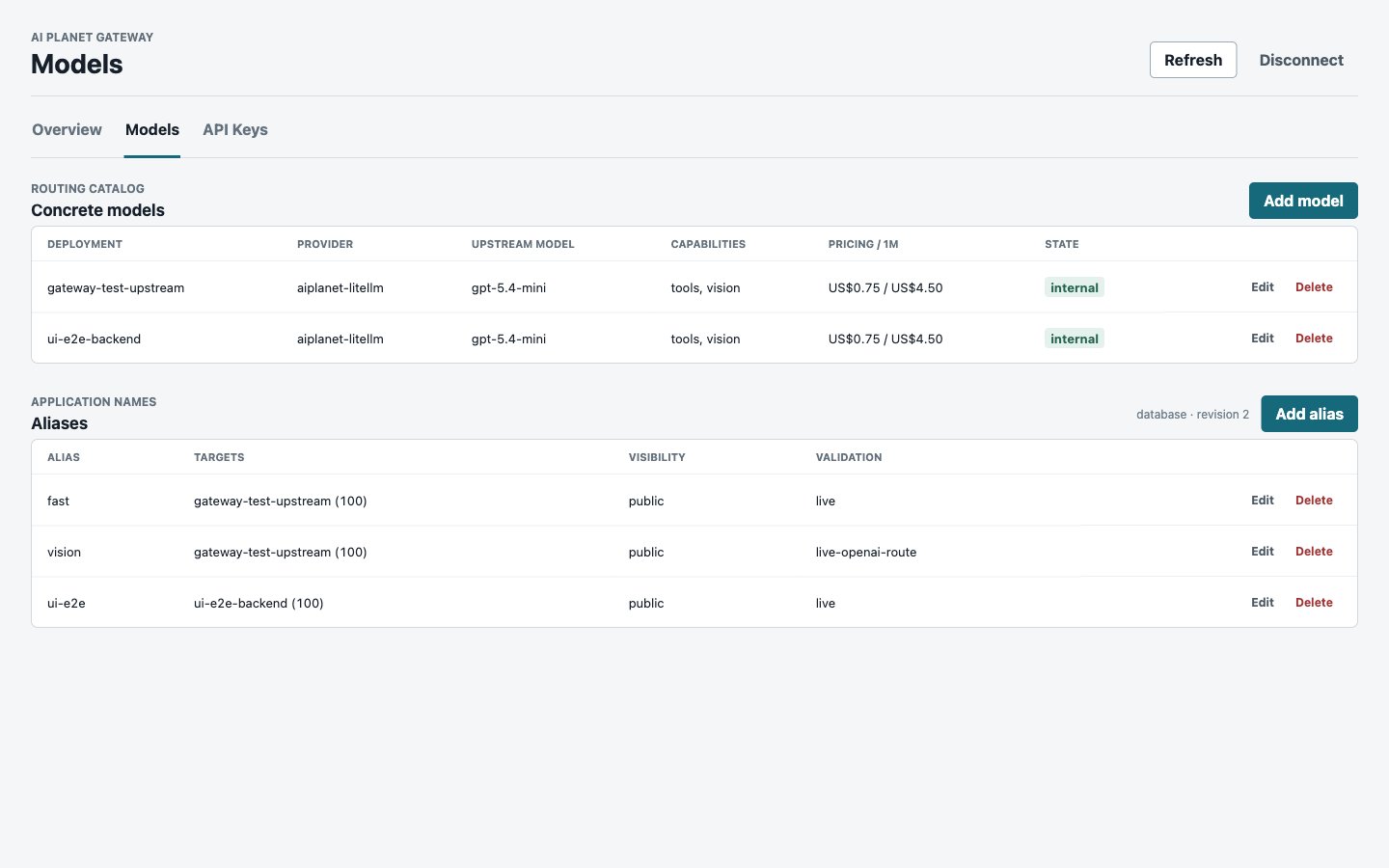 Provider credentials and provider API bases remain deployment configuration. The console can add model routes only for those configured providers. See [Models and providers](/llm-gateway/administration/models).
## Console security
The console belongs on the private operator surface. Its HTML and static assets do not require authentication, but every data request requires a valid session and every mutation requires the CSRF token bound to that login. OIDC Authorization Code + PKCE and an AI Planet Platform organization-membership handoff are available when configured; local passwords remain the audited break-glass path. Platform handoff tokens are short-lived, single-use, and submitted by form POST rather than stored by the browser. Admin bearer keys are for API automation, not browser login. See [Security](/llm-gateway/security) for session, role, audit, and network controls.
Provider credentials and provider API bases remain deployment configuration. The console can add model routes only for those configured providers. See [Models and providers](/llm-gateway/administration/models).
## Console security
The console belongs on the private operator surface. Its HTML and static assets do not require authentication, but every data request requires a valid session and every mutation requires the CSRF token bound to that login. OIDC Authorization Code + PKCE and an AI Planet Platform organization-membership handoff are available when configured; local passwords remain the audited break-glass path. Platform handoff tokens are short-lived, single-use, and submitted by form POST rather than stored by the browser. Admin bearer keys are for API automation, not browser login. See [Security](/llm-gateway/security) for session, role, audit, and network controls.