> ## Documentation Index
> Fetch the complete documentation index at: https://docs.platform.aiplanet.com/llms.txt
> Use this file to discover all available pages before exploring further.
# Connecting Nodes
> How to wire nodes together and define the flow of information.
Connecting nodes is how you tell the workflow what runs, in what order, and how information passes between steps.
## How connections work
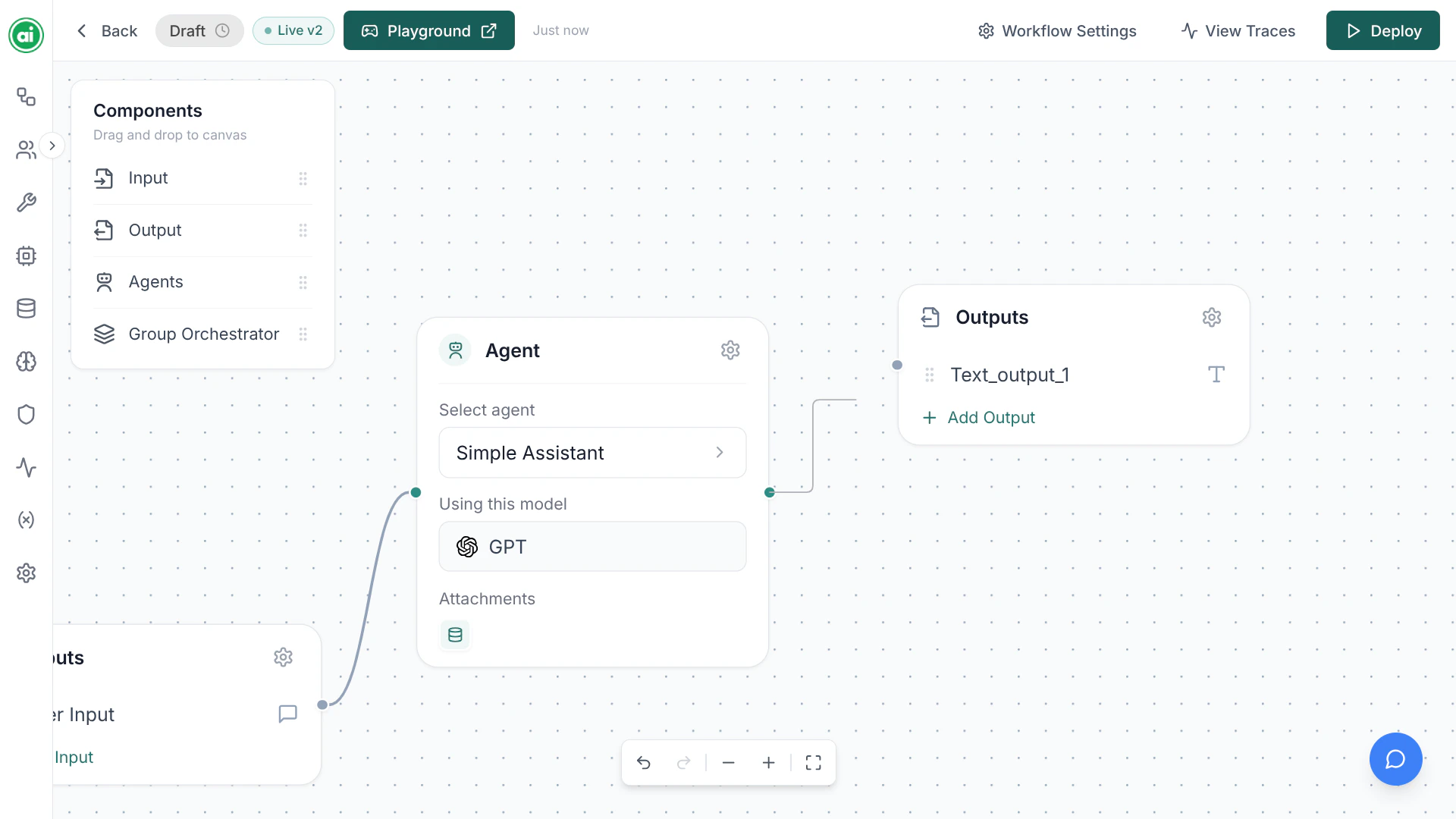
Every node has **handles** — small dots on its edges. To connect two nodes, drag from the handle on one node to the handle on another. This draws an **edge** between them.
An edge means: *the result of the first node flows into the second node.*
 ## A typical flow
Most workflows follow this shape:
```
Input → Agent → Output
```
* The **Input** node's parameters flow into the **Agent**.
* The **Agent** processes them and produces a result.
* That result flows into the **Output** node, which the workflow returns.
More complex workflows branch out from here — an agent might pass its result to another agent, or a Group Orchestrator might coordinate several agents.
## Managing connections
* **Create an edge** — drag from one handle to another.
* **Delete an edge** — select it and remove it.
* **Reconnect** — delete the old edge and draw a new one.
## Tips for clean workflows
Lay nodes out left to right in execution order. It makes the flow easy to read at a glance and easier to debug in [Tracing](/running-monitoring/tracing).
* Make sure every node is connected — a node with no connections won't participate in the run.
* Connect your final step into an **Output** node, or the workflow has nothing to return.
* Keep one clear path through the workflow unless you specifically need branching.
## Next steps
Set up the agent at the heart of your workflow.
## A typical flow
Most workflows follow this shape:
```
Input → Agent → Output
```
* The **Input** node's parameters flow into the **Agent**.
* The **Agent** processes them and produces a result.
* That result flows into the **Output** node, which the workflow returns.
More complex workflows branch out from here — an agent might pass its result to another agent, or a Group Orchestrator might coordinate several agents.
## Managing connections
* **Create an edge** — drag from one handle to another.
* **Delete an edge** — select it and remove it.
* **Reconnect** — delete the old edge and draw a new one.
## Tips for clean workflows
Lay nodes out left to right in execution order. It makes the flow easy to read at a glance and easier to debug in [Tracing](/running-monitoring/tracing).
* Make sure every node is connected — a node with no connections won't participate in the run.
* Connect your final step into an **Output** node, or the workflow has nothing to return.
* Keep one clear path through the workflow unless you specifically need branching.
## Next steps
Set up the agent at the heart of your workflow.